AlurSekolah · School Management
AlurSekolah: School App for Parents, Teachers, and Treasurers
A school app with a mobile view for parents, teachers, and treasurers, plus a web view for treasurers and admins. Three AlurKerja BPMN processes issue monthly school fee invoices, settle payments through a payment gateway or in cash, lock and unlock grade access based on invoice status, and record grades, attendance, schedules, and Quran memorization from teachers.
View the AlurSekolah Demo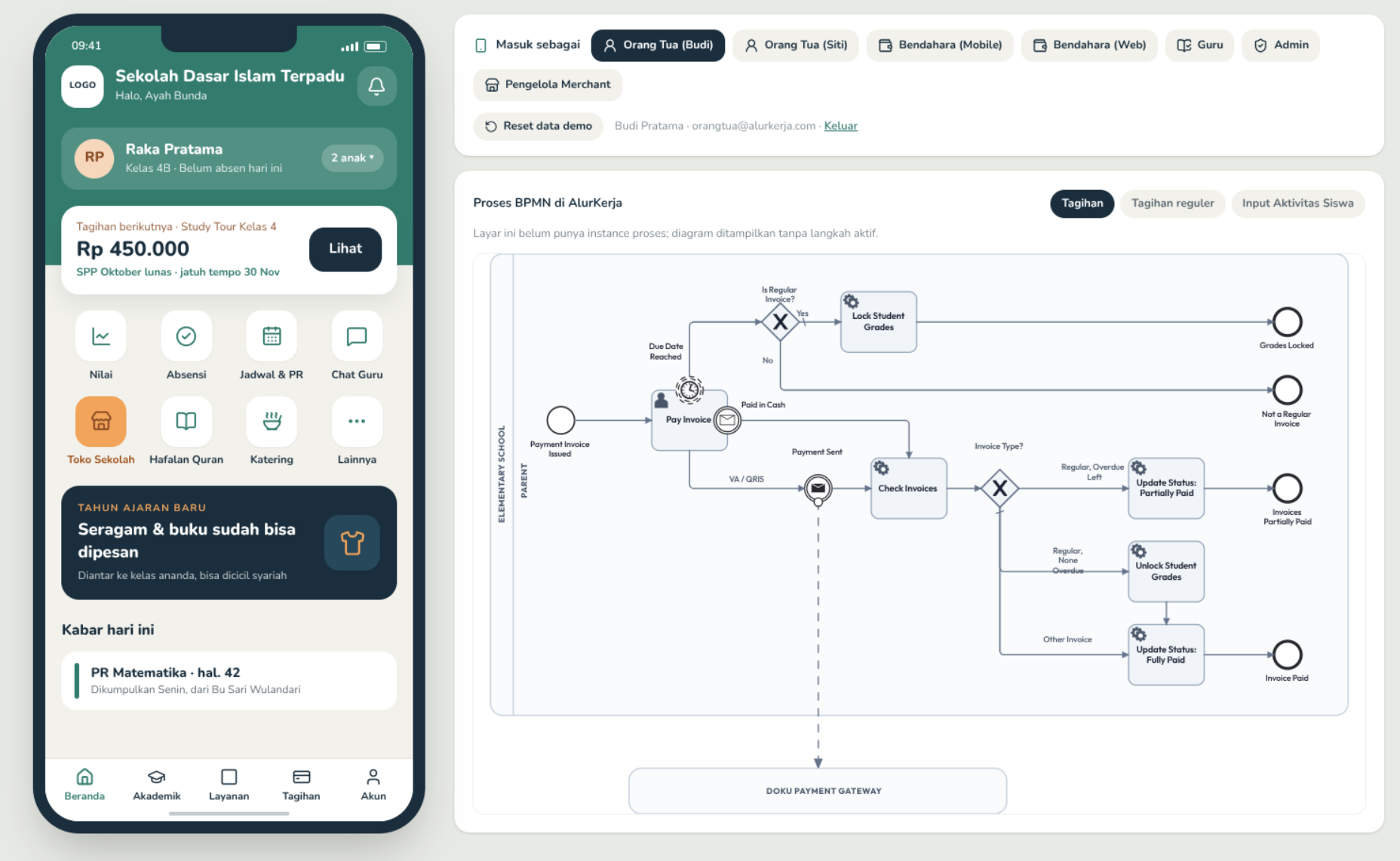
What is the AlurSekolah workflow?
AlurSekolah is a school administration workflow made of three processes. Monthly Invoice runs on a timer on the first of every month and issues school fees for every active student. The Payment Invoice process waits for parents to pay by Virtual Account or QRIS, or for the treasurer to record a cash payment, then checks the remaining invoices to set a partially paid or fully paid status and unlock the student grades. If the due date passes, a timer locks grade access. The Submit Student Activity process routes teacher input to saving grades, class attendance, lesson schedules, or Quran memorization records.
Benefits of digitizing school administration
Automatic Monthly School Fee Invoices
A BPMN timer issues school fees for every active student on the first of the month. Treasurers can also issue manual invoices for many students at once and review a full-year fee summary per class.
Virtual Account, QRIS, and Cash Payments
Parents pay in the app by Virtual Account or QRIS, or pay cash to the treasurer. The payment gateway notification completes the process step and the parent screen switches to the success state automatically.
Grade Access Tied to Invoice Status
When a school fee passes its due date, a timer locks the student grade access. Once the overdue fees are paid, the process unlocks grade access again without admin intervention.
Grades, Attendance, Schedules, and Quran Memorization from Teachers
Teachers enter grades for a whole class in a table, daily attendance, weekly lesson schedules, and Quran memorization records. Parents see the results in the app alongside homework and School Store purchases.
FAQ
Questions about School Management
Which processes does AlurSekolah run in AlurKerja?
There are three BPMN processes: Monthly Invoice to issue school fees each month, Payment Invoice for payment and settlement checks, and Submit Student Activity for grades, attendance, schedules, and Quran memorization.
How do bank payments reach the process?
The payment gateway is modeled as a separate pool in the BPMN. When the bank reports a completed payment, the app rechecks its status and completes the Pay Invoice step, and the process continues to the invoice check.
Where is the school data stored?
Student, parent, invoice, grade, attendance, and schedule data is stored in AlurKerja masterdata. BPMN processes write data at the end of each step, and the app reads it back for every role.
View the AlurSekolah Demo
Fill out the data below, and our team will send demo access to your email.