BPMN Modeler: Design and Run BPMN 2.0 Processes
AlurKerja is a web-based BPMN tool from Indonesia that combines a BPMN 2.0 modeler and a workflow engine in one platform. You draw business process diagrams to the BPMN 2.0 standard, add forms and task assignments, then run them as workflows without moving the diagram to another application. AlurKerja is developed by PT Javan Cipta Solusi in Yogyakarta, Indonesia.
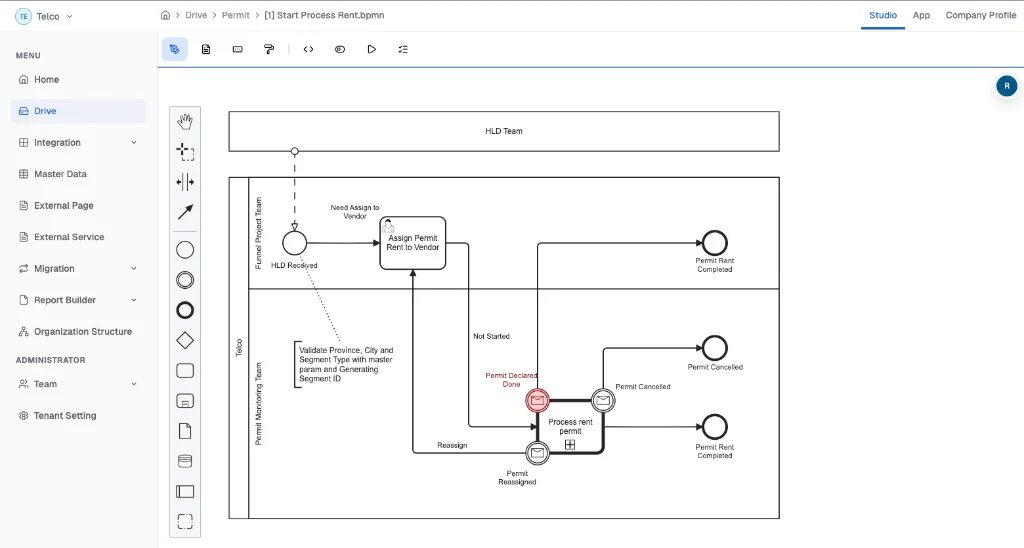
How to create a BPMN diagram in AlurKerja
From a blank diagram to a running process, in seven steps.
-
1
Sign up and open Drive in Studio
Sign up or log in, choose a workspace, then open Drive in AlurKerja Studio. All your process diagrams live here.
-
2
Create a new BPMN diagram
Choose Create BPMN. Start from a blank canvas, let AI draft the process from a text description, use a process template, or upload a .bpmn file you already have.
-
3
Draw the flow with BPMN 2.0 elements
Drag elements from the palette: start and end events, tasks, gateways, pools, and lanes. Connect them with sequence flows and color-code parts of the process.
-
4
Add execution details
In the properties panel, set who works on each task based on your org chart, the form to fill in, notifications, and integrations such as REST API, email, external databases, or Odoo.
-
5
Test with token simulation
Run a token simulation to see which path the process takes at every gateway before your team uses it.
-
6
Save, deploy, and run
Every save is kept as a version. Deploy the diagram to the AlurKerja workflow engine, and your team can start, work on, and monitor the process.
-
7
Share and document
Download the diagram as a .bpmn file, a PNG image, or an SOP document in PDF and Word, or share it with a public link.
Detailed guides for each step are in the AlurKerja documentation.
Example: a recruitment process in BPMN
The "Company" pool is split into HRD, Technical Expert, and BOD lanes. HRD receives the application and checks the paperwork; the exclusive gateway "Apakah lolos review awal?" (passed the initial review?) decides whether the candidate moves on to the technical assessment by the Technical Expert (the "Ya"/yes path) or takes the "Tidak"/no path.
In AlurKerja, each user task in this diagram can get a form and be assigned to the matching lane, then run as a real process. More process examples are in the template gallery.

Supported features
BPMN 2.0 modeler in the browser
Built on bpmn-js. Nothing to install; diagrams are stored as BPMN 2.0 XML (.bpmn).
Built-in workflow engine
Diagrams deploy to an engine based on the Camunda 7 fork maintained by the AlurKerja team, with its source code on GitHub.
Form builder & task assignment
Build forms for start events and user tasks, then assign tasks to roles or people in your org chart.
AI process drafts
Describe the process in text and AI drafts a diagram you can edit.
Process templates
Start from ready-made process templates (HR, procurement, helpdesk, and more), then customize them.
Token simulation
Test flows and gateway branches right in the modeler.
Diagram versioning
Every save is kept as a version, so process changes can be traced.
No-code integrations
Service tasks for REST API, email, notifications, external databases, and Odoo ERP.
Upload & download .bpmn
Upload .bpmn files to Drive and download them as .bpmn, PNG, or an SOP document (PDF/Word).
Unlimited users
No per-seat fees: your whole team can design and run processes. Actual capacity follows your server infrastructure.
DMN for decision rules
Alongside BPMN, a DMN modeler is available for decision tables.
See also all AlurKerja features, about the Camunda 7 fork, and the BPMN glossary.
BPMN tools compared
Each tool has its own strengths. This table summarizes the main differences based on public information as of November 2026; check each tool's official site for the latest details.
| Tool | Main focus | Price | How you use it | BPMN 2.0 XML format | Runs the process | Forms & task assignment |
|---|---|---|---|---|---|---|
| AlurKerja | BPMN modeling + workflow execution | Paid, from IDR 950,000/month; unlimited users (no per-seat fee); on-premise available | Web, account required | Yes (.bpmn) | Yes, built-in engine | Yes |
| Camunda Modeler | Modeling for the Camunda engine | Free (open source) | Desktop app, no account | Yes | Not in the modeler; needs a separate Camunda engine | Technical configuration for the Camunda engine |
| bpmn.io | BPMN modeling in the browser | Free (open source) | Web, no account | Yes | No | No |
| Bizagi Modeler | Process modeling and documentation | Free (modeler) | Windows desktop app | Yes, via import/export | Not in the modeler; via other Bizagi products | Not in the modeler |
| draw.io | General diagrams, not BPMN-specific | Free | Web or desktop, no account | No; BPMN shapes are saved as a drawing (.drawio) | No | No |
When another tool fits better
- You only need a quick sketch, free and without logging in: bpmn.io or draw.io is more practical.
- Your developers already run a Camunda engine and want a desktop modeler that works offline: Camunda Modeler is the natural choice.
- You only need process documentation on Windows without running processes: Bizagi Modeler is enough.
When AlurKerja fits better
AlurKerja fits better when the diagram has to become a process that actually runs: with forms, assignments, notifications, integrations, and monitoring, backed by a local Indonesian team and an on-premise option.
Frequently asked questions
What is a BPMN tool?
A BPMN tool is an application for drawing business process diagrams with BPMN (Business Process Model and Notation) 2.0, the OMG standard also published as ISO/IEC 19510. Some tools only draw; others, like AlurKerja, can also run the diagram as a workflow.
Does AlurKerja support the BPMN 2.0 standard?
Yes. The AlurKerja modeler is built on bpmn-js and stores diagrams as BPMN 2.0 XML (.bpmn). Standard elements such as events, tasks, gateways, pools, and lanes are in the palette.
Can I import or export .bpmn files?
Yes. You can upload .bpmn files to AlurKerja Drive and download them again as .bpmn. Diagrams can also be downloaded as PNG or as an SOP document (PDF/Word). Vendor-specific attributes from other tools may need adjusting before the process runs in AlurKerja.
Can BPMN diagrams in AlurKerja be run directly?
Yes. Once forms and assignments are set, the diagram is deployed to the AlurKerja workflow engine, a Camunda 7 fork maintained by the AlurKerja team. Your team can then start, work on, and monitor the process.
Is AlurKerja free?
No. AlurKerja is paid, with subscriptions from IDR 950,000 per month and on-premise licenses for enterprises. Pricing is not per user (unlimited users), so your whole team can join without per-seat fees. If you only need to draw diagrams without running them, free tools such as bpmn.io, Camunda Modeler, or draw.io may be a better fit.
Can AI help create BPMN diagrams?
Yes. When you create a new diagram, you can have AI draft the process from a text description. You can still edit the draft in the modeler before running it.
How is it different from draw.io or general diagram apps?
In draw.io, BPMN shapes are just a drawing and cannot be run. AlurKerja stores diagrams as executable BPMN 2.0 XML, with forms, assignments, and integrations.
Can AlurKerja be installed on-premise?
Yes. Besides SaaS, AlurKerja is available as an on-premise or private cloud deployment, so process data stays on your company's servers.
Create your first BPMN diagram
Create an account to start drawing, or book a demo and our team will show you how to model and run your processes.